naming the chord you play, in real time
A real-time MIDI and computer-keyboard chord monitor: a root-agnostic chord-detection engine with correct enharmonic spelling, built as a signed and notarized macOS app in Electron, React, and TypeScript.
why i built it
Alongside making music, I teach music theory and production lessons online. A lot of that happens at the keyboard: I play a voicing and explain why it works. But a screen-share doesn’t show what my hands are doing, and stopping to name every chord out loud breaks the flow of a lesson.
Paid tools exist that show chords from MIDI, but the ones I tried were rigid: one naming convention, one spelling, no say over inversions or how busy the readout got. In a lesson I want to control exactly how a chord is named and spelled to match whatever I’m teaching that day, so I built a tool with those controls.
The core problem went deeper than I expected. Turning a handful of held keys into the chord name a musician would actually write down is much harder than it looks, and getting it right is what kept me going well past “good enough for a lesson.”
what is it?
Live Chord Monitor is a desktop app that listens to every connected MIDI device and the computer keyboard, works out the chord you’re playing in real time, and shows both its name and the notes on a grand staff. Settings control the naming style, inversions, sharp or flat spelling, and how long a chord lingers on screen after you let go.
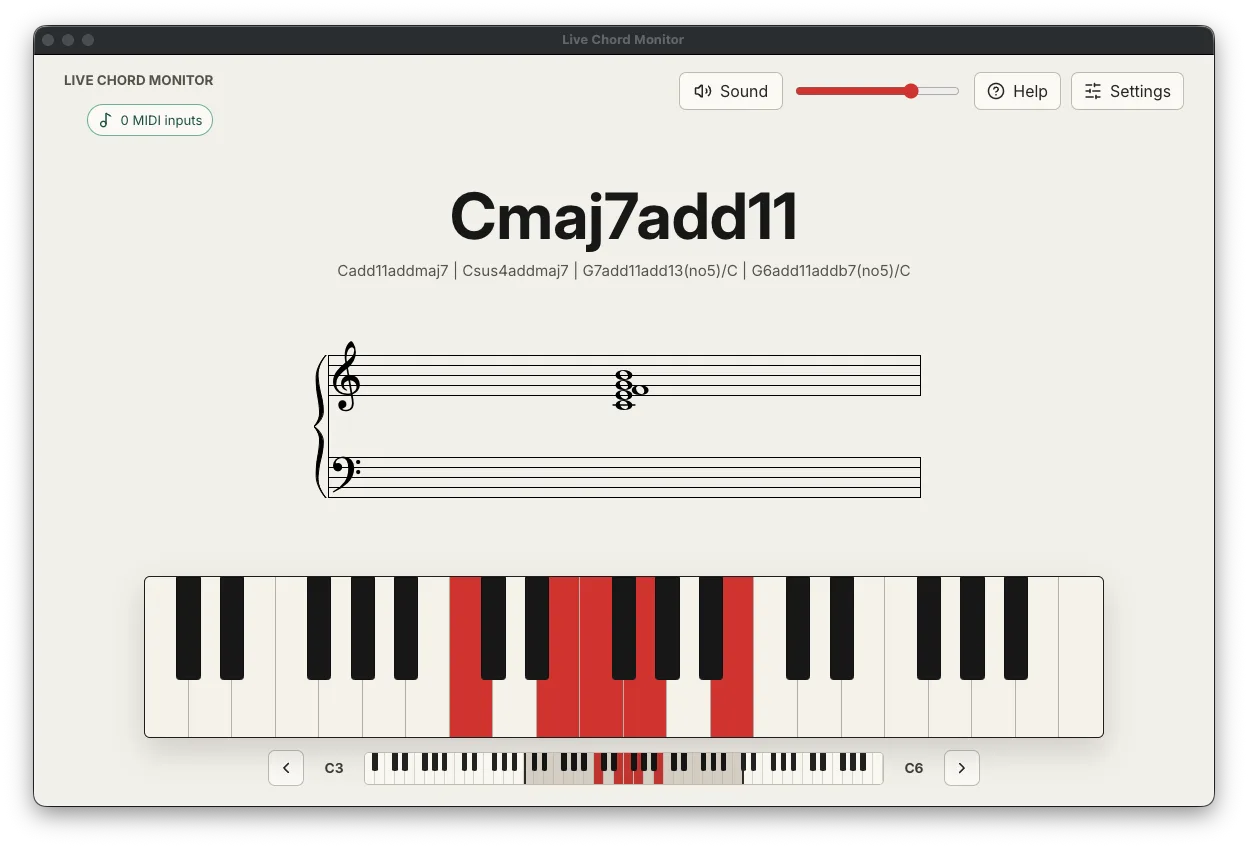
The chord-detection engine at the centre of it runs right here in the browser. I ported it from the app’s TypeScript so you can try it without installing anything. The full source is on github.com/rohanz/live-chord-monitor.
try it
The keyboard below runs that same engine. Play a chord and it shows the chord’s name and spells out its notes. Use your computer keyboard (the letters are printed on the keys) or tap the keys. A few to try: hold A D G for a C major triad (C, E, G); add J to make it a Cmaj7; or play D G K and watch it read C/E, the same triad with E in the bass, a first inversion.
That readout is doing more than looking notes up in a table. Working out a chord from a set of notes is the interesting part, so I’ll start there.
naming a chord from notes
A handful of pressed keys is just a set of pitch classes. The same set can be several different chords depending on which note you treat as the root. C, E and G spell C major, and A, C and E spell A minor. Play all four notes together and the set could be named from C or from A. So the engine doesn’t assume the lowest note is the root. It treats every active pitch class as a candidate root, measures the intervals of the other notes against it, and tests that interval set against 41 chord templates, from triads up through 13th chords and altered dominants.
Plenty of candidates can fit at once. A busy voicing might match a dozen names, so each one gets a score and the highest wins:
// Try every active note as a possible root; score how well each template fits.
const score = 100
  - missing.length * 11            // a missing tone (usually the fifth) costs a little
  - additions.length * 14          // a note the name doesn't mention costs more
  - contradictions * 12            // two thirds, two fifths or two sevenths cost more still
  + template.priority              // extensions outrank plain triads
  + (bass === root ? 8 : 0)        // reward the name whose root is actually in the bass
  + matchedTones * 3;              // and the name that accounts for more sounding notes
That scoring encodes a few decisions. Incomplete or cluttered matches lose points, and a stray note costs more than a missing one, so a clean triad beats a triad with two notes hanging off it. The priority term lets a true Cmaj9 outrank the plain Cmaj7 sitting inside it. And the same scoring produces slash chords: play C-E-G with E at the bottom and the C major reading still scores highest, so the name becomes C/E.
Real voicings often leave notes out, too. Jazz pianists drop the fifth all the time, since it adds little and frees up a finger, so the engine lets the perfect fifth go missing and still finds the chord. That is why C-E-Bb-D comes back as C9(no5) instead of matching nothing. When more than one name is defensible, up to four runners-up within 20 points of the winner show up under it as alternatives.
spelling it right
Getting the name right is only half the job. The notes have to be spelled correctly too, and pitch class alone can’t do that. Pitch class 10 is the same piano key whether you call it A# or Bb, but inside a C7 chord it is a Bb, the flat seventh, and writing A# would look wrong to any musician.
So the engine keeps no table of spellings. It steps through the chord’s notes by diatonic letter steps from the root letter, then works out each accidental from the distance between where the note actually lands and that letter’s natural pitch:
// Spell each tone by stepping diatonic LETTERS from the root, then pick the accidental
// from the gap to that letter's natural pitch. So C7's seventh is Bb, and a diminished
// seventh chord's is a double-flat (Cdim7 -> Bbb), never A# or A.
const letter = LETTERS[(rootLetterIndex + degreeForInterval(interval)) % 7];
const accidental = accidentalFor(targetPitch - naturalPitchOf(letter));
spelling[targetPitch] = `${letter}${accidental}`;
The double-flat case is the one I find most satisfying. A Cdim7 stacks minor thirds: C, Eb, Gb, and then a note that sounds like A but functions as a diminished seventh, so it has to be written B𝄫 to keep one letter per chord tone. The engine spells it that way, and that spelling flows into the notation, so the accidentals on the staff follow the theory instead of the raw key. You can see it in the demo above as the note row re-spells itself when the chord around it changes.
One limit: the sharp-or-flat choice is a single global toggle with no key-signature awareness. The engine spells correctly within a chord, but it doesn’t know you’re sitting in the key of Eb. I labeled the setting “Spelling” rather than “Key” so it doesn’t claim more than it delivers.
real time, with real hardware
The input side has its own set of problems, and they only really surface once real hardware is involved.
The first: the same note can arrive from more than one place at once. A MIDI keyboard, the computer keyboard, and a mouse click can all be holding middle C together. So the app tracks which sources are holding each note and releases a note only when the last one lets go. Lifting off one input never cuts a note another is still playing.
The second: hardware gets unplugged mid-chord. Pull out a controller while keys are down and those notes would stick forever, because the matching “note off” never arrives. The app listens for device disconnects over the Web MIDI API and fires the missing note-offs itself for whatever that device was holding.
The third is subtler, and it is purely about feel. When you lift a chord your fingers don’t all leave at the same millisecond, so for a moment the app sees the chord shrink to whichever note happened to release last, and the readout flashes a wrong name on the way out. The fix is a small state machine that separates what’s displayed from what’s held. New notes appear instantly, but a shrinking chord waits about 60 milliseconds to check whether it is a real change or the beginning of a full release, and a full release can linger and fade instead of blinking straight to blank. I moved that timing logic into its own module so I could test it against a fake clock.
shipping it
The app made sound and named a chord fairly early. That was a long way from finished.
Because it is an Electron app taking input from devices, I treated security as part of the build. The renderer runs sandboxed with context isolation and no Node access. The production UI is served over a custom privileged app:// scheme with path-traversal guarding instead of file://. There is a real Content-Security-Policy, and the permission handler grants MIDI and nothing else.
Distribution is the stage where a lot of side projects stop. This one ships as a signed and notarized universal binary: a single download that runs natively on Apple Silicon and Intel Macs, built with a hardened runtime, notarized and stapled by Apple, with every signing credential kept in the macOS keychain and out of the repo. Getting spctl to report “Notarized Developer ID” and stapler to pass is a real piece of engineering on its own, with nothing to do with music.
Live Chord Monitor is free to download. If it’s useful to you and you’d like to support future work, you can buy me a coffee.
Underneath all of it sits a suite of 282 tests. The chord engine is the most heavily covered, including a corpus of 106 voicings with their expected names: triads, sevenths, extensions, every naming and inversion mode, the fifth-omission cases, the ambiguous voicings, and spelling edge cases like C7→Bb and Cdim7→B𝄫.
what stuck with me
Chord naming is really a ranking problem. The same notes can be several legitimate chords, so the engine never looks one up. It generates every defensible candidate and scores them, which is the same shape as search relevance or a classifier: the real work is in the scoring heuristic and the tie-breaks. Once I framed it that way, ambiguous voicings stopped being bugs. I just show the runner-up names underneath.
The hardest bug was about perception. The chord theory was deterministic and working early on. What actually felt broken was the readout flickering as a chord was released, and the fix was a state machine that models the gap between what’s held and what’s shown. Responsiveness that feels right has to be designed in on purpose.
Correctness belongs in pure functions. All the chord theory is plain functions with no React, no audio, no DOM, which is exactly why I could nail down dozens of edge cases in fast unit tests and rework the scoring without worrying about breaking something. The messy, mockable parts (MIDI, audio, rendering) stay at the edges. I let the question “what do I want to be able to test?” shape the architecture.
A desktop app has a security surface a web page doesn’t. Wrapping web code in Electron gives it a path to the operating system, so “finished” had to include sandboxing the renderer, serving the UI over a locked-down scheme, enforcing a CSP, and handing the renderer only the MIDI permission. None of it shows up in a screenshot, but once people install software instead of visiting a page, that surface is yours to defend.